
Packaging PDF Export
The Output workspace is where your dieline and artwork become PDF files. Press Export, sign in with an email code and choose an output. Here is what each output contains, how exports are counted and what is not checked for you.
- Workspace
- Output
- Status
- Live; sign-in needed to export
- PDF modes
- RGB Review, CMYK Production, Professional
- Colour
- Simple CMYK, no ICC management
This is the live editor. Your project stays open when you move between DielineDock pages.
How to export
Open the Output workspace and press Export. If you are not signed in, enter your email and the 6-digit code we send; your design stays open in the workbench. Choose an output, and the download starts when the PDF is ready. To create the file, the artwork rendered from your design and the box settings are sent to our server. Exported files are kept privately in your account's export history, where you can download them again without using another export.
Pre-export checks
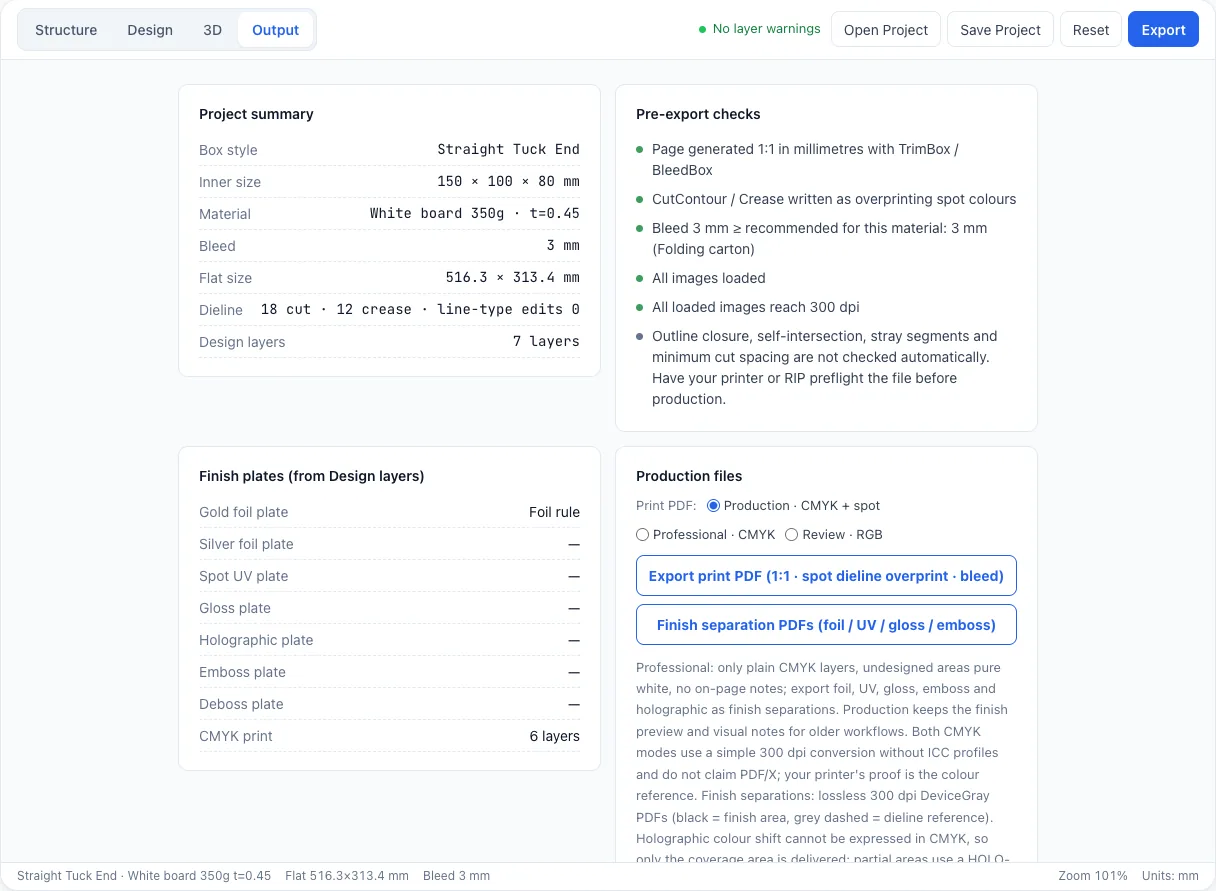
Before a PDF is generated, the Output workspace shows a project summary and these checks:
- Page is 1:1 in millimetres with TrimBox and BleedBox.
- Dieline uses CutContour and Crease spot colours with overprint.
- Bleed is compared with the material recommendation.
- All images are loaded and reach 300 dpi.
Three PDF modes
The CMYK Production PDF gives CMYK artwork plus the CutContour and Crease spot-colour dieline, with notes on the page. The Professional PDF gives CMYK artwork only, with unprinted areas left white, the spot-colour dieline and no notes. The RGB Review PDF is for on-screen sharing and layout sign-off.
Dieline spot colours and finish separations
Cuts use the CutContour spot colour and folds use Crease, both set to overprint so they do not knock out artwork. TrimBox and BleedBox mark the trim and bleed edges for prepress. Finishes export as separate files: one 300 dpi grayscale PDF per finish for foil, UV, gloss, holographic, and emboss up or down.
What is not checked, and colour
Outline closure, self-intersections and minimum cut spacing are not checked automatically. CMYK conversion is a simple 300 dpi conversion without ICC colour management, and there is no PDF/X claim. Always proof colour and structure with your printer before a run.
Export rules by plan
Starter and Pro are not open for purchase yet. The rules are:
- Free ($0): one RGB Review PDF per account verified by email one-time code, for life, with a DielineDock preview watermark. It does not reset, even after a paid plan ends.
- Starter ($9.99/month): 20 RGB Review PDF exports per subscription month, no platform watermark.
- Pro ($19.99/month): 60 export operations per subscription month, shared by RGB Review, CMYK Production, Professional and finish separation PDFs, no platform watermark.
- One successful output operation is one export, and a finish separation export counts once however many plate files it creates. Re-downloads from your export history, failed exports and repeated or double-clicked requests do not use extra exports.
- Monthly exports reset at the start of each subscription month, as confirmed by the payment provider, and unused exports do not carry over. After you cancel, the plan stays active until the end of the paid period; a refund ends its benefits. When a plan ends, the account returns to Free.
Frequently asked questions
Can I export a PDF today?
Yes. Sign in with an email code and use Export in the Output workspace. Free includes one watermarked RGB Review PDF per verified account. Starter and Pro are not open for purchase yet.
Will the PDF be print-ready?
It is built for print, with spot-colour dielines and trim and bleed boxes, but colour is not ICC-managed and some structural checks are manual. Always get a printer proof.
Does Pro remove logos from my design?
No. Starter and Pro PDFs have no platform watermark, but your artwork is not changed. Anything in your design, including the DielineDock logo in the sample box, stays until you delete it.
Can I export SVG or DXF?
No. Export is PDF only; SVG, DXF, PNG and ZIP are not offered.