
How to measure box dimensions for a custom dieline
Most box size problems start with a measurement taken the wrong way. This guide explains inner and outer dimensions, how to read length, width and height, how much clearance to add and why board thickness changes the flat size. DielineDock works in millimetres only.
- Input
- Inner L × W × H, millimetres only
- Length range
- 20–600 mm
- Width and height range
- 15–600 mm
- Default sample
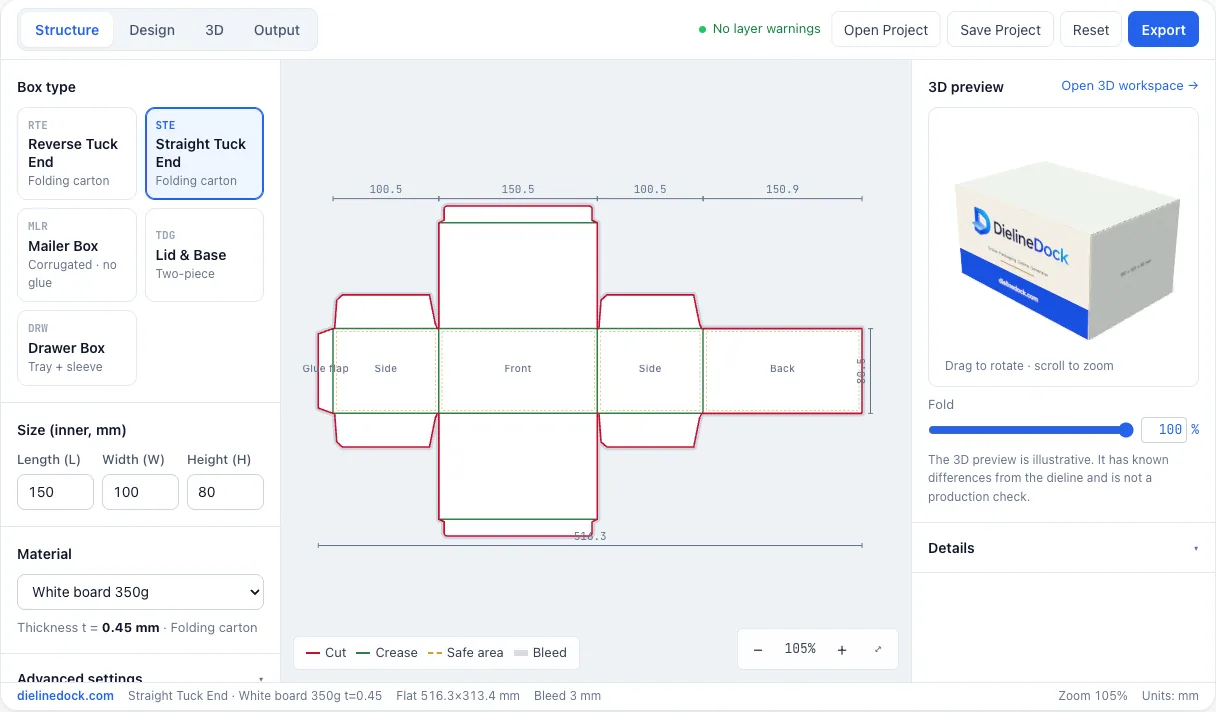
- Straight Tuck End, 150 × 100 × 80 mm
Who this guide is for
This guide is for anyone turning a physical product into a box size: founders packing a first product, designers writing a brief and makers building a prototype. The typical problem is a box that is a few millimetres too tight to close, or loose enough that the product rattles. Both usually come from mixing up inner and outer dimensions or forgetting the board.
Core concepts
Inner dimensions are the space inside the closed box, where the product sits. Outer dimensions are measured from the outside and include the board. Packaging is usually specified by inner size because that is what must fit the product, and DielineDock asks for inner length, width and height.
Length and width describe the opening; height describes the depth. L is the longer side of the opening, W is the shorter side of the opening, and H is the depth from the opening to the bottom. On a tuck end carton the opening is the end you tuck closed, so a tall carton has a large H and a small L × W.
Clearance is the small extra space that lets the product slide in and out. The right amount depends on the product, any insert or wrapping and the board, so treat a few millimetres as a starting point and confirm with a sample.
Board thickness matters because the board wraps around the product and each fold uses part of its thickness. DielineDock adds this automatically: manufacturing size = inner size + n × t, where t is the board thickness. For Straight Tuck End and Reverse Tuck End, the four body panels are W+t, L+t, W+t and L+2t wide, and the panel height is H+t.
With the 150 × 100 × 80 mm sample in white board 350g (t = 0.45 mm), the body panels are 100.45, 150.45, 100.45 and 150.9 mm wide, 502.25 mm in total before the glue flap, and 80.45 mm high. In B-flute corrugated (t = 3.0 mm) the same inner size needs 515 mm of body panels.
Practical steps in DielineDock
- 1Measure the product at its widest points, including caps, pumps or anything that sticks out.
- 2Decide which face is the opening. Record the longer side of the opening as L, the shorter side as W and the depth as H.
- 3Add clearance for how the product goes in, plus any insert, sleeve or wrapping.
- 4In DielineDock, choose the box style and type the inner L, W and H in millimetres.
- 5Choose the material you plan to use so the correct board thickness is applied.
- 6Read the panel widths and flat size in the Details panel and check the shape in the live 3D preview.
- 7Confirm the size with a physical sample and the real product. On Starter or Pro, save the project as well.
Common mistakes
- Giving the printer outer dimensions when they expect inner ones, or the other way round.
- Swapping L and W, which moves the tuck lids and changes where your front artwork lands.
- Measuring a drawing or label instead of the real product.
- Adding no clearance, or so much that the product moves around.
- Changing the material late, for example from white board to corrugated, without rechecking the size.
- Entering inches. DielineDock uses millimetres only, so convert first: 1 inch is 25.4 mm.
Frequently asked questions
Should I enter inner or outer dimensions?
Inner. DielineDock expects the inside size of the box and adds board thickness to work out the panels. If you only know an outer size, ask your supplier how it was measured before converting it.
How much clearance should I add?
There is no single number. A couple of millimetres is a common starting point for a rigid product, while soft, irregular or wrapped products may need more. Make a sample and test it with the real product.
Can I use inches?
No. DielineDock works in millimetres only. Multiply inches by 25.4 to convert, then round sensibly.
What sizes can DielineDock handle?
Length 20–600 mm, width 15–600 mm and height 15–600 mm. Whether a size can be produced in a particular material is a question for your printer.