
Preparing a packaging dieline for print
Sending a box to print is a conversation with your printer, not a single upload. This guide covers what to check, how cut and crease are marked, which settings matter and what DielineDock does not check for you and which PDF to export from the Output workspace.
- PDF export
- Available after email sign-in
- Dieline spot colours
- CutContour and Crease
- Image resolution
- 300 dpi at printed size
- Colour
- Simple CMYK conversion, no ICC profile
Who this guide is for
This guide is for small brands, designers handing off a box and makers ordering a first sample. A box can look perfect on screen and still fail in production because of missing bleed, an unclear cut line, low-resolution images or colour that shifts in print.
Which PDF to export
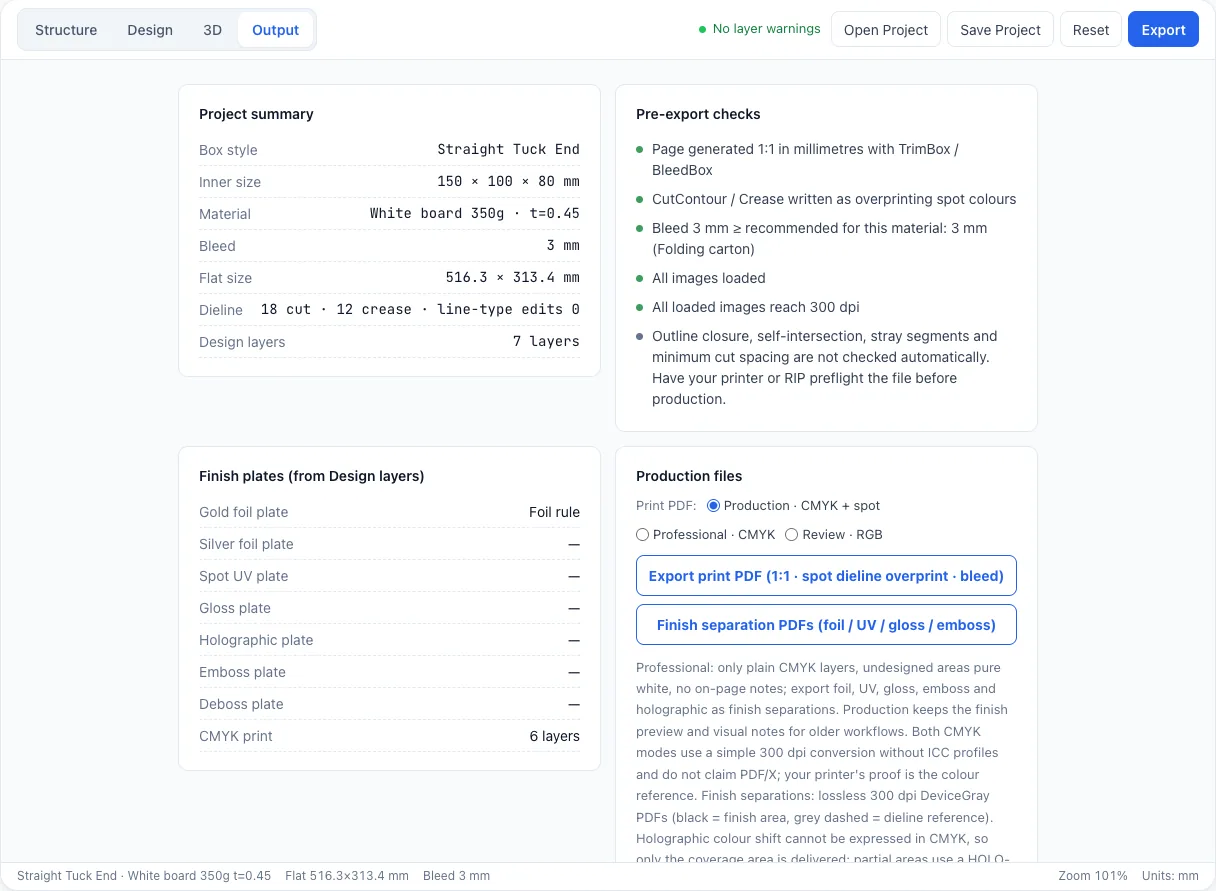
PDF export is available in the Output workspace after you sign in with an email code. Free includes one RGB Review PDF per verified account, with a DielineDock preview watermark. Starter includes 20 RGB Review PDFs per subscription month without the watermark, and Pro includes 60 export operations per subscription month for RGB Review, CMYK Production, Professional and finish separation PDFs. Starter and Pro are not open for purchase yet. The RGB Review PDF is for checking the layout and gathering feedback; CMYK Production and Professional PDFs are the files meant for your printer.
Core concepts
Cut and crease are marked as spot colours. The export engine places cut lines on a spot colour named CutContour and crease lines on one named Crease, set to overprint so they do not knock out the artwork. Tell your printer these names so they know which layer is cut and which is crease, and ask what they need if their workflow differs.
TrimBox and BleedBox are page boxes inside a PDF. The TrimBox marks the finished size and the BleedBox includes the bleed around it. Exported pages are laid out 1:1 in millimetres with both boxes set.
Images should be at least 300 dpi at their printed size, and the Design workspace warns you when one is not.
Colour conversion is a simple 300 dpi CMYK conversion without ICC colour management, and there is no PDF/X claim. Colour must be proofed by your printer.
Print modes are CMYK Production (CMYK artwork plus the spot-colour dieline, with notes on the page), Professional (CMYK artwork only, unprinted areas left white, the spot-colour dieline and no notes) and RGB Review. Finish separations give one 300 dpi grayscale PDF per finish. CMYK Production, Professional and finish separation PDFs are part of Pro, which is not open for purchase yet.
Practical steps in DielineDock
- 1Confirm the box style, inner dimensions and material, and note the flat size in the Details panel.
- 2Check that the bleed matches the material recommendation or your printer's specification.
- 3Clear or confirm every Design warning: crease crossings, layers outside the panel or safe area, and images under 300 dpi.
- 4Make sure all images are loaded and all text is spelled correctly.
- 5Review the folded box in 3D for upside-down or misplaced artwork.
- 6On Starter or Pro, save the .boxproj project file.
- 7In the Output workspace, review the pre-export checks: page size, TrimBox and BleedBox, spot colours, bleed against the material recommendation and image resolution. Then export.
What is not checked automatically
These items are on a manual check before production list. Ask your printer to review them too.
- Whether the cut outline is fully closed.
- Whether any lines self-intersect.
- Whether cut lines are at least 1.5 mm apart.
- Whether every crease joins two panels.
- Colour accuracy, board strength and fit with the real product.
Common mistakes
- Not telling the printer which spot colour is cut and which is crease.
- Expecting screen colour to match print without a proof.
- Skipping a physical sample before a full run.
- Leaving the sample box's DielineDock logo and domain layers in the design by accident.
- Treating any PDF as certified or print-ready without printer approval.
Frequently asked questions
Can I export a print PDF today?
Yes. Sign in with an email code and export from the Output workspace. Free includes one watermarked RGB Review PDF. CMYK Production, Professional and finish separation PDFs are part of Pro, which is not open for purchase yet.
Will my printer accept the file?
Requirements differ between printers, so confirm first. Share the spot colour names, bleed, dimensions and colour approach, and ask what they need.
Why are proofs and samples essential?
A proof checks colour and content; a sample checks fit, folding and board behaviour. Neither can be confirmed on screen, and DielineDock does not guarantee production results.
Is the PDF PDF/X compliant?
DielineDock makes no PDF/X claim. If your printer requires PDF/X, ask how they would like to handle the file.