
E-commerce packaging: mailer boxes for shipping and unboxing
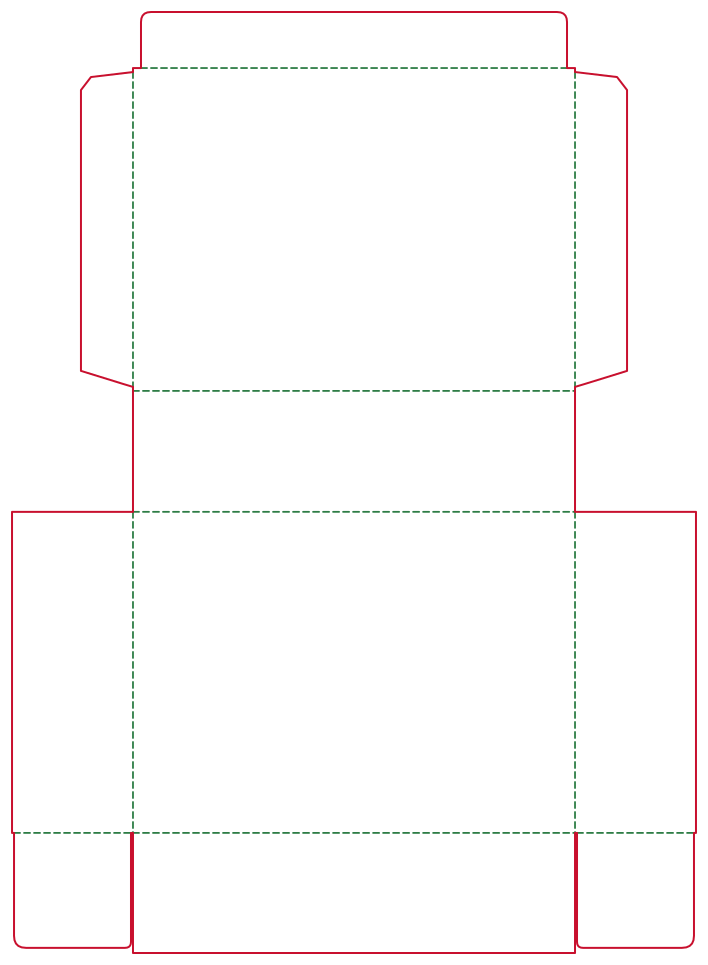
Online orders travel through the post before anyone sees them, so the box has to protect the product and still make a good first impression. DielineDock lets you plan a mailer box, add your brand and check it in 3D.
Who uses it
Online shops, subscription brands and designers preparing shipping boxes that double as branded packaging.
The packaging problems they face
A shipping box must fit the product with its packing material, survive handling and be quick to pack, and it should look good when opened. The wrong size wastes space and filler; the wrong board can mean a box that is too weak or heavier than it needs to be.
Recommended box styles
DielineDock's corrugated options are F-flute micro corrugated (0.8 mm), E-flute corrugated (1.5 mm) and B-flute corrugated (3.0 mm), each with a 5 mm recommended bleed. DielineDock does not calculate strength, so confirm the right board for your product weight and shipping method with your supplier.
- Mailer Box: a one-piece box with a hinged lid, tuck flap and side walls with ears folded in. It needs no glue and suits shipping and unboxing.
- Straight Tuck End: for small, light items that ship inside an outer carton or padded mailer.
- Drawer Box: for a gift-style reveal packed inside an outer shipping box.
How to set dimensions
Measure the product together with any insert, tissue or filler, then enter the inner L, W and H in millimetres. Thickness has a large effect on corrugated board: the Mailer's side walls are H+t and the lid width is W+3t, so moving from F-flute to B-flute changes the flat size noticeably.
How to add brand artwork
Add your logo, text and colour blocks in Design on the lid, front wall and side walls. Extend backgrounds into the bleed and keep text inside the safe area. Watch for crease warnings where the lid hinge runs through your design.
How to check the result in 3D
Use Play fold to watch the walls rise and the lid close. Check that the logo reads correctly with the lid shut, and compare natural kraft and coated white presets. The model is illustrative, with approximated flaps.
How to produce files for discussion or samples
Export a PDF from the Output workspace after signing in with an email code. Free includes one RGB Review PDF with a preview watermark for discussing the layout. CMYK Production and Professional PDFs are part of Pro, which is not open for purchase yet. You can also share screenshots of the dieline and 3D view with your supplier to discuss samples. On Starter and Pro you can save a .boxproj project file too.
What to confirm with the printer
- Flute type and board grade for your product weight and shipping method.
- Box strength and any testing you need.
- Printing method on corrugated and how fine detail will reproduce.
- Bleed and how cut and crease lines should be marked.
- Sample availability, minimum order quantity and lead time.
Frequently asked questions
Which corrugated board should I choose?
DielineDock offers F-flute, E-flute and B-flute. Thicker flutes are generally stronger, but the right choice depends on your product and shipping, so confirm with your supplier.
Does the Mailer Box need glue?
No. In DielineDock it is a one-piece fold-up box with side ears folded in and no glue flap.
Can DielineDock tell me if my box is strong enough?
No. It does not test or calculate strength. Ask your supplier for a sample and any testing you need.