
Drawer Box
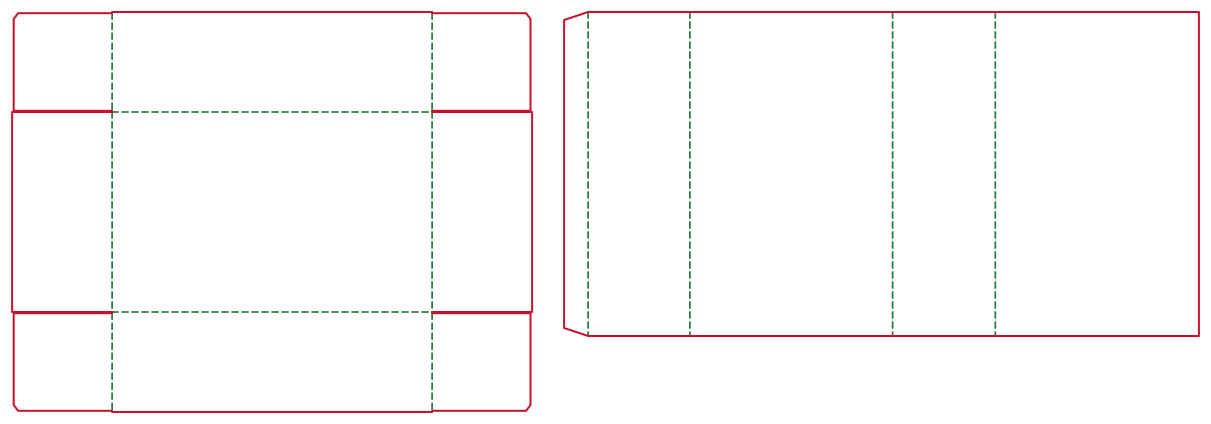
The drawer box pairs an inner tray with an outer sleeve, so the product slides out like a drawer. DielineDock builds both pieces from one set of inner dimensions and adds the clearance the tray needs.
- Pieces
- Two: tray and sleeve
- Sleeve allowance
- Depth L + 2 mm; panels + 2–4 × t
- Best for
- Small gifts and premium items
- Default size
- Set your own
What a drawer box is
A drawer box, also called a slide box, is an open tray that slides inside a four-sided sleeve. Pushing the tray out reveals the product gradually.
How the structure is built
DielineDock creates two pieces. The inner tray holds the product; the outer sleeve wraps around it and is open at both ends. The sleeve depth is L + 2 mm and its panels get an extra 2 to 4 × t, so the tray can slide without binding.
Products it suits
Small, valuable or giftable items: jewellery, chocolates, playing cards, tea, cosmetics sets and accessories. The sleeve carries the branding, while the tray can hold a second colour or a message revealed on opening.
Strengths and limitations
Strengths: a memorable sliding reveal, a sleeve printed as one continuous wrap, and a tray that keeps contents in place. Limitations: two pieces to make and assemble, and a slide that depends on board thickness and cutting accuracy. Too tight and the tray sticks, too loose and it falls out, so a physical sample is essential.
Dimension notes
Enter the inner L × W × H of the tray; the sleeve is sized from it. Sleeve depth is L + 2 mm, so a 120 mm tray gets a 122 mm sleeve. Sleeve panels add 2 to 4 × t: with 400g white board (t = 0.5 mm) that is 1 to 2 mm, with F-flute (0.8 mm) 1.6 to 3.2 mm. That is why changing material affects the sleeve more than the tray.
Suitable materials
White board 350g or 400g gives smooth, rigid sleeves that slide well. Coated paper 300g suits small card or jewellery drawers, and kraft board 350g a natural finish. F-flute micro corrugated can strengthen larger drawers; thicker corrugated makes the sleeve bulky.
How to create it in DielineDock
- 1Open the editor and choose Drawer Box.
- 2Enter the inner length, width and height of the tray.
- 3Select the material; the sleeve allowance follows its thickness.
- 4Check the recommended bleed.
- 5Review tray and sleeve on the canvas and in the Details panel.
- 6Design the sleeve wrap and the tray.
How to preview and export
Fold both pieces in the 3D workspace to check that the sleeve artwork reads correctly around the box. The preview is illustrative and does not test the slide. To export, open the Output workspace and press Export; Free includes one watermarked RGB Review PDF. On Starter or Pro, you can also save a .boxproj file.
Frequently asked questions
Do I enter the tray or the sleeve size?
The tray. DielineDock sizes the sleeve from it, with depth L + 2 mm and a 2 to 4 × t panel allowance.
Why is the sleeve longer than the tray?
The extra 2 mm of depth lets the tray slide fully in without catching on the sleeve edges.
Can I save my drawer box and keep editing later?
Yes, on Starter or Pro. Save Project downloads a .boxproj file with box settings, layers, materials and scene, without using a PDF export. Open Project reopens it on any plan; the project is not stored in the cloud.
Will the drawer slide smoothly?
The allowances are designed for it, but the result depends on board, coating and cutting. Always test a physical sample.